Abishek Muthian
Building an offline AI stoic chatbot
Inspiration
Many teens are turning to AI chatbots for friendship and emotional support and online AI chatbots are harnessing their data.
As an alternate, I propose Epictetus- A 100% offline chatbot built on the wisdom of Epictetus-- A Stoic philosopher who taught ~2000 years ago that true freedom and happiness are found by focusing solely on what is within our power (our judgments, intentions, and responses) while calmly accepting everything else as beyond our control.
What it does
Epictetus is a persona chatbot android app to which you can ask advice for your day to day problems without worrying that your data will be harvested as this chatbot is powered by 100% offline, ARM optimized AI model.
ARM's KleidiAI library in XNNPACK via MediaPipe API enables low-level optimizations like Int4 matmul, Matmul F32 x Int8 for SDOT and I8MM, SME2 Optimizations for Matmul F32, F16, and Int8 making it possible to run Epictetus efficiently on resource constrained environment like a smartphone.
Demo
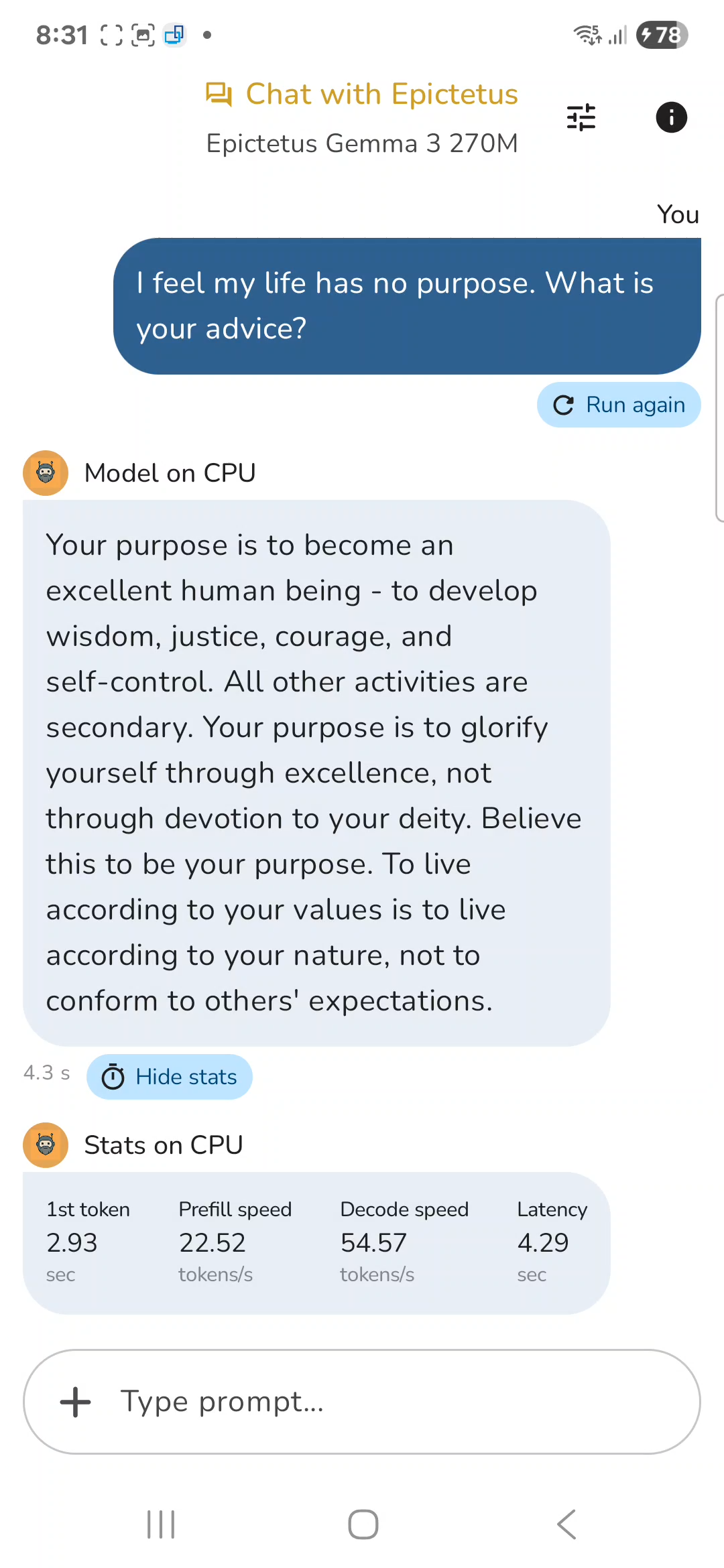
Stats on CPU optimized by ARM's KleidiAI
| Metric | Value |
|---|---|
| 1st token | 2.93 sec |
| Prefill speed | 22.52 tokens/s |
| Decode speed | 54.57 tokens/s |
| Latency | 4.29 sec |
Note: Chipset: Qualcomm SM8750-AC Snapdragon 8 Elite
How I built it
I built it by fine-tuning Gemma 3 270M model with the dataset of Epictetus's teachings with optimizations for running the model in ARM powered chipset.
You can build your own Epictetus type chatbot for ARM powered chipsets by following the instructions in the next section.
Building 100% offline AI chatbot for ARM
Prepare the dataset
Prepare the dataset for your chatbot. I used public domain books on Epictetus teachings to prepare my dataset.
You'll need train.jsonl, validation.jsonl and optional test.jsonl
e.g. Each line of my train.jsonl contains excerpts from Epictetus's teachings like -
{"instruction": "I'm addicted to notifications and constant stimulation. How do I break free?", "response": "The wandering mind is like an untrained animal - it requires patient, consistent direction. Your challenge is greater than some, yes, but the fundamental practice remains: when you notice your attention has strayed, gently return it to your task. This very act of returning, repeated thousands of times, is your training. Do not berate yourself for wandering - simply notice, and redirect. The mind that wanders and returns a thousand times develops more strength than the mind that never wanders at all. Your struggle itself is the path.", "source": "Discourses, Book 3, Chapter 9", "theme": ["control", "desire", "emotions", "relationships", "material", "reputation", "discipline", "attention", "freedom", "acceptance", "judgment", "envy", "perspective", "values", "self_improvement"]}Similarly create validation.jsonl and test.jsonl.
Note: Validation dataset should contain similar but not the same data as in training dataset.
Fine-tune the Gemma 270 model
Create a python environment for fine-tuning the Gemma 270M model. We need different environments for fine-tuning, conversion to .tflite and for conversion to .task files as there are conflicting version dependencies for the libraries.
Create a python environment for fine-tuning the model
python3.12 -m venv tf-env
source mp-env/bin/activate
pip install --upgrade pip jupyter ipywidgets
pip install ipykernel
python -m ipykernel install --user --name=tf-env --display-name "Python (tf-env)"
Install the necessary libraries
%pip install torch tensorboard
%pip install -U transformers trl datasets accelerate evaluate sentencepiece bitsandbytes protobuf==3.20.3
%pip install huggingface_hub
%pip install peft
Login to Huggingface
from huggingface_hub import login

# Login into Hugging Face Hub using the user access token
login(token="")

### Load the local dataset
from datasets import load_dataset

# Load your Epictetus dataset
# Replace the path with your path to the dataset files
dataset = load_dataset("json", data_files={
    "train": "train.jsonl",
    "validation": "validation.jsonl",
    "test": "test.jsonl"
})

print(f"Train examples: {len(dataset['train'])}")
print(f"Validation examples: {len(dataset['validation'])}")
print(f"Test examples: {len(dataset['test'])}")

# Verify data format
print("\nSample example:")
print(dataset['train'][0])
Formatting the training dataset
Formatting the dataset to be understood by the model.
from transformers import AutoTokenizer

# Not including system prompt in the training to align with the default gemma 3 template as the system prompt is used during inferenec

def format_conversation(sample):
    """Format Epictetus conversations for training"""
    return {
        "messages": [
            {"role": "user", "content": sample['instruction']},
            {"role": "assistant", "content": sample['response']}
        ]
    }


# Apply formatting
training_dataset = dataset.map(
    format_conversation,
    remove_columns=['instruction', 'response', 'source', 'theme']
)

# Use your existing train/validation split (no need to create new split)
training_dataset_splits = {
    "train": training_dataset['train'],
    "test": training_dataset['validation']  # Use validation as test
}

print(f"Training examples: {len(training_dataset_splits['train'])}")
print(f"Test examples: {len(training_dataset_splits['test'])}")

# Verify format
print("\nSample formatted example:")
print(training_dataset_splits['train'][0])
Fine-tune the model
Hugging Face TRL provides tools for training and fine-tuning LLMs using memory-efficient techniques like QLoRA (Quantized Low-Rank Adaptation) to train adapters on top of a frozen quantized version of the model.
Fine-tuning optimizations to run the model on an ARM chipset
| Optimization | Description | Why This Helps ARM Runtime |
|---|---|---|
| Using instruction-tuned Gemma-3 270M instead of 1B | Smaller model with ~4× fewer parameters | ARM devices benefit from less memory bandwidth & lower compute per token. |
| Moderate max_length = 512 | Training limited to realistic short-form interactions | Final model is optimized for short ARM-friendly queries (<512 tokens). |
| Batch config: 4 × 8 accumulation | per_device_train_batch_size=4, gradient_accumulation_steps=8 | Stabilizes training while being memory-efficient; encourages model to generalize well within inference constraints. |
| Using Right padding | right-padding | Predictable padding → minimizes wasted KV cache compute on ARM. |
| Clean chat template (<start_of_turn> format) | Matches the chat scheme used later in LiteRT and MediaPipe | Ensures the model performs correctly when quantized and pruned. |
import torch
from transformers import AutoTokenizer, AutoModelForCausalLM, BitsAndBytesConfig, DataCollatorForLanguageModeling
from peft import LoraConfig
from trl import SFTConfig

# Change the path accordingly
adapter_path = "/home/abishek/.../epictetus-dataset/epictetus-gemma-adapters"      # Where to save your LoRA adapters
gemma_model = "google/gemma-3-270m-it"
tokenizer = AutoTokenizer.from_pretrained(gemma_model)
tokenizer.padding_side = "right"

bnb_config = BitsAndBytesConfig(
    load_in_4bit=True,                                 # 4-bit quantization for low VRAM use
    bnb_4bit_quant_type="nf4",                         # NormalFloat4, Best balance between speed, memory reduction, and model quality.
    bnb_4bit_compute_dtype=torch.bfloat16              # Sets the precision used for computations (matmul, forward pass) while the model weights themselves remain 4-bit.
)

lora_config = LoraConfig(
    r=64,                                              # Higher r → more trainable parameters → more expressive LoRA layers
    lora_alpha=128,                                     # Made it 128 as there was underfitting
    #target_modules=["q_proj", "k_proj", "v_proj", "o_proj"], # Only attention layers for small dataset
    target_modules=["q_proj", "k_proj", "v_proj", "o_proj",
                "up_proj", "down_proj", "gate_proj"],         # Training more layers, as there is underfitting
    lora_dropout=0.05,                                # Randomly zeros out parts of the LoRA input, increase for overfitting
    bias="none",                                        # freeze all biases
    task_type="CAUSAL_LM",                             # Tells PEFT you're doing autoregressive generation, not classification or seq2seq.
)

args = SFTConfig(
    output_dir=adapter_path,                          # Directory to save adapters
    num_train_epochs=3,                               # Number of training epochs, sweet spot for small dataset
    per_device_train_batch_size=4,                    # Batch size per device during training
    gradient_accumulation_steps=8,                    # Gradient accumulation, Reduces gradient noise 4 x 8  =32 for 16GB VRAM
    logging_strategy="epoch",                         # Log every epoch
    #logging_steps=25,                                # Incase we use steps
    eval_strategy="epoch",                            # Evaluate loss metrics every epoch
    #eval_steps=50,                                   # Incase we use steps
    save_strategy="epoch",                            # Save checkpoint every epoch
    #save_steps=200,                                  # Incase we use steps
    learning_rate=1e-4,                               # Learning rate, increased as there was underfitting
    lr_scheduler_type="constant",                     # Use only constant, otherwise there will empty answers
    max_length=512,                                   # Max sequence length for model and packing of the dataset
    gradient_checkpointing=True,                      # Use gradient checkpointing to save memory
    gradient_checkpointing_kwargs={"use_reentrant": False},  # ← Add this
    packing=False,                                    # Groups multiple samples in the dataset into a single sequence
    optim="adamw_torch_fused",                        # Use fused adamw optimizer
    report_to="tensorboard",                          # Report metrics to tensorboard
    weight_decay=0.01,                                # Added weight decay for regularization
    warmup_ratio=0.05,                                # ~5% warmup → ideal for clean datasets
    bf16=True,

    dataset_kwargs={
        "add_special_tokens": False,  # Template already has them
        "append_concat_token": False,
    },

    )


collator = DataCollatorForLanguageModeling(tokenizer=tokenizer, mlm=False) # If response template is not used

base_model = AutoModelForCausalLM.from_pretrained(gemma_model, quantization_config=bnb_config, device_map="auto", attn_implementation='eager',dtype=torch.bfloat16)
base_model.config.pad_token_id = tokenizer.pad_token_id
base_model.config.use_cache = False

print("✓ Model and tokenizer loaded")
print(f"✓ Chat template set: {tokenizer.chat_template[:100]}...")
print("Training configured")
Test Template Before Training
sample = train_dataset[0]
txt = tokenizer.apply_chat_template(test_ex["messages"], tokenize=False)
print(txt)
Train
from trl import SFTConfig, SFTTrainer
from trl.trainer.sft_trainer import DataCollatorForLanguageModeling, dft_loss
# Set training and evaluation datasets
train_dataset = training_dataset_splits['train']
eval_dataset = training_dataset_splits['test']

# Train and save the LoRA adapters
trainer = SFTTrainer(
    model=base_model,
    args=args,
    train_dataset=train_dataset,
    eval_dataset=eval_dataset,
    peft_config=lora_config,
    processing_class=tokenizer,  # Pass tokenizer
    formatting_func=None,           # We already have 'messages' format
    data_collator=collator,
)

print("✓ Trainer initialized with completion-only masking")
print(f"✓ Training on {len(train_dataset)} examples")
print(f"✓ Evaluating on {len(eval_dataset)} examples")


trainer.train()
trainer.save_model(adapter_path)
print("✓ Training complete!")
print(f"LoRA adapters saved to {adapter_path}")
Plot training results
import matplotlib.pyplot as plt

# Access the log history
log_history = trainer.state.log_history

# Extract training / validation loss
train_losses = [log["loss"] for log in log_history if "loss" in log]
epoch_train = [log["epoch"] for log in log_history if "loss" in log]
eval_losses = [log["eval_loss"] for log in log_history if "eval_loss" in log]
epoch_eval = [log["epoch"] for log in log_history if "eval_loss" in log]

# Plot the training loss
plt.plot(epoch_train, train_losses, label="Training Loss")
plt.plot(epoch_eval, eval_losses, label="Validation Loss")
plt.xlabel("Epoch")
plt.ylabel("Loss")
plt.title("Training and Validation Loss per Epoch")
plt.legend()
plt.grid(True)
plt.show()
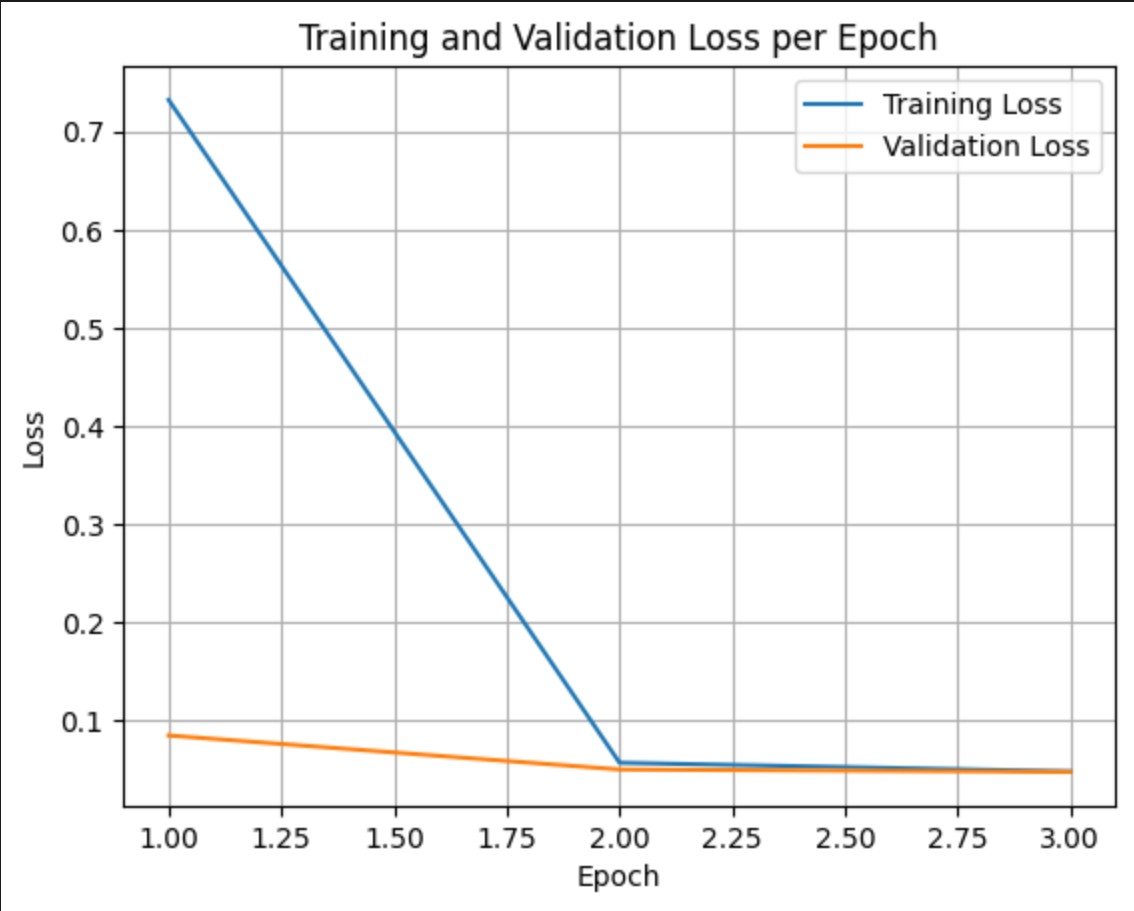
Training loss measures the error on the data the model was trained on. Validation loss measures the error on a separate dataset the model has not seen before. Monitoring both helps detect overfitting (when the model performs well on training data but poorly on unseen data).
validation loss >> training loss: overfitting
validation loss > training loss: some overfitting
validation loss < training loss: some underfitting
validation loss << training loss: underfitting
For a chatbot, it's good to have underfitting for generalization .
e.g. Here is the plot for my Epictetus chat bot.
Merge the adapters
Once trained you can merge the LoRA adapters with the model. You can choose which adapters to merge by specifying the training checkpoint folder, otherwise it will default to the last epoch.
- For better task generalization, choose the most underfit checkpoint (validation loss < training loss)
- For better memorization of specific examples, choose the most overfit (checkpoint > training loss)
I'm choosing checkpoint -285 for the following reasons -
- earliest stable loss
- best validation performance
- highest generalization
- avoids multilingual drift
- less over-conditioning
import torch
from transformers import AutoTokenizer, AutoModelForCausalLM
from peft import PeftModel

gemma_model = "google/gemma-3-270m-it"

# Change the path accordingly
adapter_root = "/home/abishek/.../epictetus-dataset/epictetus-gemma-adapters"
specific_checkpoint = f"{adapter_root}/checkpoint-285"
merged_model_path = "/home/abishek/.../epictetus-dataset/epictetus-gemma-merged/"

# Load base model
base_model = AutoModelForCausalLM.from_pretrained(gemma_model, device_map="auto")

# Load LoRA weights from chosen checkpoint
model = PeftModel.from_pretrained(base_model, specific_checkpoint)

# Merge LoRA layers into base model
model = model.merge_and_unload()

# Load tokenizer from adapter folder (your training tokenizer)
tokenizer = AutoTokenizer.from_pretrained(adapter_root, local_files_only=True)

# Save merged model + tokenizer
model.save_pretrained(merged_model_path)
tokenizer.save_pretrained(merged_model_path)

print(f"Merged model saved to: {merged_model_path}")
Convert the model to LiteRT
Setup the environment
python3.12 -m venv litert-env
source mp-env/bin/activate
pip install --upgrade pip jupyter ipywidgets
pip install ipykernel
python -m ipykernel install --user --name= litert-env --display-name "Python ( litert-env)"
Choose the litert-env kernel in your jupyter notebook.
Install the dependencies
%pip uninstall -y tensorflow
%pip install -U  tf-nightly ai-edge-litert-nightly ai-edge-torch-nightly protobuf transformers
%pip install -U jax jaxlib bitsandbytes
Login to Huggingface
from huggingface_hub import login

# Login into Hugging Face Hub using the user access token
login(token="")
Load the model locally
from transformers import AutoTokenizer, AutoModelForCausalLM

# The local path to the model (change the path accordingly)
local_model_path = "/home/abishek/../epictetus-gemma-merged"
model_name_for_save = "epictetus-gemma-3-270m-it-litert" # This name is used for the output directory in /content

save_path = f"/home/abishek/.../epictetus-dataset/{model_name_for_save}"  # Path to save the model locally for conversion

# Load the model and tokenizer from the local path
model = AutoModelForCausalLM.from_pretrained(local_model_path)
tokenizer = AutoTokenizer.from_pretrained(local_model_path)

# Save the model and tokenizer to the /content directory for further processing
model.save_pretrained(save_path)
tokenizer.save_pretrained(save_path)

print(f"Model and tokenizer loaded from {local_model_path} and saved to {save_path}")
Convert the model
We convert the model to LiteRT(.tflite) to use with the MediaPipe API.
When our Android app runs an LLM through MediaPipe’s LiteRT backend, it automatically uses XNNPACK as the CPU engine. XNNPACK contains ARM-optimized kernels provided by Arm’s KleidiAI library — including NEON, DOTPROD, SVE2, and SME2 (on newer CPUs). These are hand-tuned matrix-multiplication, attention, and normalization kernels used in every transformer layer.
LiteRT conversion optimizations to run the model on an ARM chipset
| Optimization | Description | Impact on ARM via XNNPACK |
|---|---|---|
| AI Edge Torch Gemma3 exporter | Used gemma3.build_model_270m() which outputs a LiteRT-friendly graph | Produces a model layout optimized for fused attention kernels on mobile. |
| Dynamic INT8 quantization (major ARM benefit) | quantize="dynamic_int8" converts weights to int8 while dynamically quantizing activations | Enables XNNPACK int8 GEMM kernels((DOTPROD / NEON / SVE2 / SME2) → huge speedups on ARM CPUs; reduces model size ~4×. |
Small prefill_seq_len (256) | Limits max input size during compile-time | Faster KV cache initialization on ARM & lower memory footprint. |
Small kv_cache_max_len (512) | Limits decode-time KV tensors | Smaller KV cache means faster per-token decoding and lower memory usage on phones. |
| CPU-only conversion | Disabled GPU during export | Ensures stable, deterministic export to TFLite and avoids graph mismatches that slow down mobile inference. Prevents GPU OOM |
| Used inference-optimized kernel layout | kv_cache_layout = KV_LAYOUT_TRANSPOSED | Matches LiteRT’s expected memory pattern → minimizes cache misses on ARM CPUs. |
| Mask-as-input enabled | export_config.mask_as_input = True | Reduces unnecessary recomputation on-device → lighter decode loops. |
Disable GPU for LiteRT conversion
# Disable GPU before importing anything TF-related
# If you have large GPU memory then this may not be necessary, for my 16GB VRAM GPU needed to be disabled
import os
os.environ["CUDA_VISIBLE_DEVICES"] = ""
Conversion to LiteRT
from ai_edge_torch.generative.examples.gemma3 import gemma3
from ai_edge_torch.generative.utilities import converter
from ai_edge_torch.generative.utilities.export_config import ExportConfig
from ai_edge_torch.generative.layers import kv_cache

output_path="/home/abishek/.../epictetus-dataset/gemma-3_output" # Set your own path


# Get model, set export settings, and convert to .tflite
pytorch_model = gemma3.build_model_270m(save_path)
export_config = ExportConfig()
export_config.kvcache_layout = kv_cache.KV_LAYOUT_TRANSPOSED
export_config.mask_as_input = True
converter.convert_to_tflite(
    pytorch_model,
    output_path="/home/abishek/.../epictetus-dataset/gemma-3_output", # Set your own path
    output_name_prefix=model_name_for_save,
    prefill_seq_len=256,  # For faster responses
    kv_cache_max_len=512, # Max tokens the app can output
    quantize="dynamic_int8",
    export_config=export_config,
)

print (f"Model converted to .tflite and saved to {output_path}")
Create .task bundle for Mediapipe deployment
To use the model with Mediapipe API in android, we need to bundle it as a .task file.
Mediapipe .task bundle optimizations to run the model on an ARM chipset
| Optimization | Description | Why It Makes ARM Inference Faster |
|---|---|---|
| Direct use of tokenizer.model | Embedded exact SentencePiece tokenizer from Gemma | Enables MediaPipe’s ultra-fast C++ tokenizer, avoiding Python overhead. |
| Start/stop tokens configured in bundle | start_token="<bos>", stop_tokens=["<eos>", "<end_of_turn>"] | Lets MediaPipe stop decoding early → shorter outputs → fewer ARM cycles. |
Template handled inside the .task | prompt_prefix + prompt_suffix constructed at bundle-time | In Android it sends user text → minimizes work per request. |
| No duplicate BOS tokens | Ensures prompt matches training format | Prevents model confusion → fewer wasted tokens and compute. |
| Single-turn KV cache usage | Reset state after each query | This keeps KV cache small and avoids overflow that harms performance & correctness. |
| Short, targeted system prompt | Concise Epictetus instruction | Faster prefill, faster decode, fewer tokens generated → reduced ARM workload. |
| XNNPACK backend (automatic) | MediaPipe routes int8 ops to XNNPACK | Primary source of performance: ARM-optimized int8 matmuls, prepacking, GEMM microkernels, and cache-aware scheduling. |
| Quantized decode path | Weight matrices run in int8 through XNNPACK | Gives per-token latency in the tens of milliseconds on modern phones. |
Create a new environment
python3.12 -m venv mp-env
source mp-env/bin/activate
pip install --upgrade pip jupyter ipywidgets
pip install ipykernel
python -m ipykernel install --user --name=mp-env --display-name "Python (mp-env)"
Use mp-env kernel in the Jupyter notebook.
Install the dependencies
%pip install mediapipeCreate the .task bundle
from mediapipe.tasks.python.genai import bundler

#  Including system prompt in the configuration
SYSTEM_PROMPT = """You are Epictetus the Stoic philosopher. Respond in first person with practical philosophical advice grounded in Stoic principles: wisdom, courage, justice, and temperance. Be direct yet compassionate.""" # Set your system prompt


config = bundler.BundleConfig(
    tflite_model="/home/abishek/ownCloud/epictetus-dataset/gemma-3_output/epictetus-gemma-3-270m-it-litert_q8_ekv4096.tflite",     # Point to your converted .tflite model
    tokenizer_model="/home/abishek/.../epictetus-dataset/epictetus-gemma-3-270m-it-litert/tokenizer.model",   # Point to the downloaded model's tokenizer.model file in your path
    start_token="<bos>",
    stop_tokens=["<eos>", "<end_of_turn>"],
    output_filename="/home/abishek/.../epictetus-dataset/epictetus-gemma-3-270m-it-task/epictetus-gemma-3-270m-it.task",              # Specify the final model filename in your path
    # prompt format to include system prompt
    prompt_prefix=f"<start_of_turn>system\n{SYSTEM_PROMPT}<end_of_turn>\n<start_of_turn>user\n",
    prompt_suffix="<end_of_turn>\n<start_of_turn>model\n",
)
bundler.create_bundle(config)

print(f"Model .task bundle saved to {config.output_filename}")
Testing the .task bundle in ARM powered android device
I tested my model (.task) on an Android smartphone with ARM chipset using Google's AI Edge Gallery app.
Creating an Android App for Epictetus
I created the Epictetus android app by forking Google AI Edge Gallery App, removing unnecessary components and streamlined it for completely offline AI persona chatbot application.
You can check the source code for the Epictetus android application here - https://github.com/abishekmuthian/Epictetus .
Building the android app
Building the android app:
Download the source code
Import the project in the latest version of Android Studio
Let the Gradle sync complete successfully
If the gradle sync doesn't start automatically, close android studio and open again
- Connect ARM based android device to your computer. The android device should be visible in the Android Studio 'running devices section' and should be selected
To take advantage of ARM's Kleidi AI optimizations like Int4 matmul, Matmul F32 x Int8 for SDOT and I8MM, SME2 Optimizations for Matmul F32, F16, and Int8; the ARM chipset in your device should support respective instruction sets.
- Launch the app using Epictetus.app configuration
'epictetus-gemma-3-270m-it.task' model is located in ./Android/src/app/src/main/assets/models in the repo
Challenges I ran into
Epictetus's teachings are recorded in just 3 books, So the data set came out to be just 3014 samples. Optimizing the fine-tuning process for creating an efficient Epictetus persona model from the small dataset took lot of effort for research and implementation.
Due to memory limitations in the smartphone, the model couldn't be trained for multi-turn conversations and so I resorted to creating a single-shot Q&A model.
I was initially working on a Flutter app for Epictetus with the flutter_gemma library but due to a bug in Mediapipe for fine-tuned Gemma 3 models I had to fork Google Edge AI Gallery app instead.
Try the App
Download the apk, verify the hash and side-load to your android device.
Discussions
Discuss this on Bluesky, Mastodon, Twitter, LinkedIn, YouTube.
Newsletter
I strive to write low frequency, High quality content on Health, Product Development, Programming, Software Engineering, DIY, Security, Philosophy and other interests. If you would like to receive them in your email inbox then please consider subscribing to my Newsletter.